Usage
Parallelization and optimization with one macro call
A simple call to @parallel is enough to parallelize and optimize a function and to launch it. The package used underneath for parallelization is defined in a call to @init_parallel_stencil beforehand. The following example outlines how to run parallel computations on a GPU using the native kernel programming capabilities of CUDA.jl underneath (omitted lines are represented with #(...), omitted arguments with ...):
#(...)
@init_parallel_stencil(CUDA,...)
#(...)
@parallel function diffusion3D_step!(...)
    #(...)
end
#(...)
@parallel diffusion3D_step!(...)
Automatic advanced fast memory usage optimization (of shared memory and registers) can be activated with the keyword argument memopt=true:
@parallel memopt=true function diffusion3D_step!(...)
    #(...)
end
#(...)
@parallel diffusion3D_step!(...)
Note that arrays are automatically allocated on the hardware chosen for the computations (GPU or CPU) when using the provided allocation macros: @zeros, @ones, @rand, @falses, @trues, @fill. The array types matching the chosen package and number type are available in the module Data that @init_parallel_stencil creates in the calling module (e.g. Data.Array).
Backends
The following packages are supported for parallelization:
using ParallelStencil
@init_parallel_stencil(CUDA, Float64, 3)using ParallelStencil
@init_parallel_stencil(AMDGPU, Float64, 3)using ParallelStencil
@init_parallel_stencil(Metal, Float32, 3)import CUDA # Import the GPU packages to be used at runtime.
using ParallelStencil
@init_parallel_stencil(package=KernelAbstractions, numbertype=Float64, ndims=3)using ParallelStencil
@init_parallel_stencil(Threads, Float64, 3)using ParallelStencil
@init_parallel_stencil(Polyester, Float64, 3)The support for GPUs (CUDA.jl, AMDGPU.jl or Metal.jl), for KernelAbstractions.jl and for Polyester.jl is provided with package extensions and requires therefore an explicit installation of the corresponding package. Note that it is not required to import the single-architecture backend package explicitly; this is automatically done by @init_parallel_stencil. With Base.Threads and Polyester.jl, the number of threads used is defined when starting Julia (e.g. julia -t 8 or with the environment variable JULIA_NUM_THREADS). When using KernelAbstractions, the session starts on the CPU and the hardware target can be switched at runtime (see Interactive prototyping with runtime hardware selection).
Stencil computations with math-close notation
ParallelStencil provides submodules for computing finite differences in 1-D, 2-D and 3-D with a math-close notation (FiniteDifferences1D, FiniteDifferences2D and FiniteDifferences3D). Custom macros to extend the finite differences submodules or for other stencil-based numerical methods can be readily plugged in. The following example shows a complete function for computing a time step of a 3-D heat diffusion solver using FiniteDifferences3D:
#(...)
using ParallelStencil.FiniteDifferences3D
#(...)
@parallel function diffusion3D_step!(T2, T, Ci, lam, dt, dx, dy, dz)
    @inn(T2) = @inn(T) + dt*(lam*@inn(Ci)*(@d2_xi(T)/dx^2 + @d2_yi(T)/dy^2 + @d2_zi(T)/dz^2));
    return
end
The macros used in this example are described in the API reference and can also be queried from the Julia REPL:
julia> using ParallelStencil.FiniteDifferences3D
julia>?
help?> @inn
  @inn(A): Select the inner elements of A. Corresponds to A[2:end-1,2:end-1,2:end-1].

help?> @d2_xi
  @d2_xi(A): Compute the 2nd order differences between adjacent elements of A along the along dimension x and select the inner elements of A in the remaining dimensions. Corresponds to @inn_yz(@d2_xa(A)).
Note that @d2_yi and @d2_zi perform the analogue operations as @d2_xi along the dimension y and z, respectively.
A complete application is shown in the 50-lines example.
Architecture-agnostic low level kernel programming
High-level stencil computations with math-close notation can be completed with index-based programming using the macro @parallel_indices. For example, the following kernel enables setting Neumann boundary conditions in dimension y (∂A/∂y = 0) when using finite differences in 3-D:
@parallel_indices (ix,iz) function bc_y!(A)
    A[ix,   1, iz] = A[ix,     2, iz]
    A[ix, end, iz] = A[ix, end-1, iz]
    return
end
It can be launched as follows:
@parallel (1:size(A,1), 1:size(A,3)) bc_y!(A)Furthermore, a set of architecture-agnostic low level kernel language constructs is supported in these @parallel_indices kernels (see Kernel language in the API reference). They enable, e.g., explicit usage of shared memory (see this 2-D heat diffusion example) and usage of warp-level primitives.
Interactive prototyping with runtime hardware selection
The KernelAbstractions backend keeps the familiar parse-time @init_parallel_stencil workflow while enabling runtime hardware switches through the @select_hardware and @current_hardware macros; the runtime hardware target defaults to CPU and can be switched as many times as desired during a session without requiring redefinition of kernels or reinitialization of the backend (these macros insert calls to corresponding functions which will be executed at runtime, i.e. the hardware switch occurs at runtime, not at parse time, following the normal control flow of the user program). The following copy-pasteable example outlines this workflow with a simple SAXPY kernel, demonstrating initial execution on CPU followed by a switch to CUDA-capable GPU and a second execution there:
# --- Session setup -----------------------------------------------------
import CUDA                                                             # 1 Import backends to be used by the KernelAbstractions backend
using ParallelStencil
@init_parallel_stencil(package=KernelAbstractions, numbertype=Float32)  # 2 Initialize KernelAbstractions backend at parse time
const N = 2;
const α = 1.5;

# --- Kernel definition -------------------------------------------------
@parallel_indices (i) function saxpy!(Y, α, X)                          # 3 Define a single time a hardware-agnostic SAXPY kernel
  Y[i] = α * X[i] + Y[i]
  return
end

# --- First run on default runtime hardware (CPU) -----------------------
println("Current runtime hardware target: ", @current_hardware())       # 4 Query current (default) runtime hardware target
X = @fill(3, N)                                                         # 5 Allocate data on the current target
Y = @ones(N)                                                            # ...
@parallel saxpy!(Y, α, X)                                               # 6 Launch kernel on the current target
Y                                                                       # 7 Observe correct results

# --- Reselect runtime hardware to CUDA-capable GPU and run again -------
@select_hardware(:gpu_cuda)                                             # 8 Switch runtime hardware target to CUDA-capable GPU
println("Current runtime hardware target: ", @current_hardware())       # 9 Confirm the CUDA-capable GPU runtime hardware target
X = @fill(3, N)                                                         # 10 Allocate data on the new target
Y = @ones(N)                                                            # ...
@parallel saxpy!(Y, α, X)                                               # 11 Launch kernel on the new target without redefining anything
Y                                                                       # 12 Observe correct results
The supported runtime hardware targets and the symbols to select them are listed in the documentation of select_hardware.
Trade-offs of the KernelAbstractions backend
The convenience modules Data and TData with fixed data types are only available for single-architecture backends. Warp-level primitives are only partially supported in @parallel_indices kernels. @hide_communication has no effect with KernelAbstractions (but the code nevertheless executes correctly).
Seamless interoperability with communication packages and hiding communication
ParallelStencil is seamlessly interoperable with ImplicitGlobalGrid.jl, as shown in the 50-lines multi-xPU example. The same is a priori true for any communication package that allows to explicitly decide when the required communication occurs; an example is MPI.jl (besides, MPI.jl is also seamlessly interoperable with ImplicitGlobalGrid.jl and can extend its functionality).
Moreover, ParallelStencil enables hiding communication behind computation with a simple call to @hide_communication. In the following example, the communication performed by update_halo! (from the package ImplicitGlobalGrid.jl) is hidden behind the computations done by @parallel diffusion3D_step!:
@hide_communication (16, 2, 2) begin
    @parallel diffusion3D_step!(T2, T, Ci, lam, dt, dx, dy, dz);
    update_halo!(T2);
end
This enables close to ideal weak scaling of real-world applications on thousands of GPUs/CPUs [4, 5]. Profiling a 3-D viscous Stokes flow application using the Nvidia visual profiler (nvvp) graphically exemplifies how the update velocities kernel is split up in boundary and inner domain computations and how the latter overlap with point-to-point MPI communication for halo exchange: 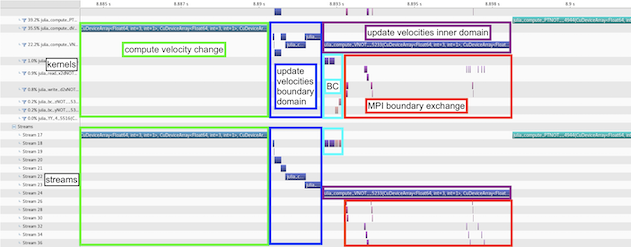
Independent kernels can furthermore be overlapped with each other with @overlap.
Logical arrays of small arrays / structs
Logical arrays of small arrays / structs enabling optimized data access can be conveniently created with the architecture-agnostic allocation macros introduced above. To this purpose, ParallelStencil leverages CellArrays (from CellArrays.jl, which relies in turn on StaticArrays.jl). To create a logical array of small arrays, it is sufficient to pass to any of these allocation macros the keyword celldims with the dimensions of the inner arrays, e.g.:
nx, ny, nz = 128, 128, 128
celldims   = (4, 4)
A = @rand(nx, ny, nz, celldims=celldims)
To create a logical array of structs, a custom cell type can be defined using the macro @CellType and then passed to any of the allocation macros via the keyword celltype, e.g.:
@CellType SymmetricTensor3D fieldnames=(xx, yy, zz, yz, xz, xy)
#(...)
A = @zeros(nx, ny, nz, celltype=SymmetricTensor3D)
Details are found in the documentation of the allocation macros.
Fields on a staggered grid (scalar, vector and tensor fields) can be allocated in one go with the macros of the submodule FieldAllocators.
Automatic differentiation of architecture-agnostic parallel kernels
Enzyme.jl-powered automatic differentiation of architecture-agnostic parallel kernels is fully integrated into ParallelStencil's API and exposed both with high-level and generic syntax. The keyword argument ∇ is enough to trigger a parallel call to the gradient kernel instead of the kernel itself, e.g:
#(...)
@parallel_indices (ix) function f!(A, B, a)
    A[ix] += a * B[ix] * 100.65
    return
end

N = 16
a = 6.5
A = @rand(N)
B = @rand(N)
Ā = @ones(N)
B̄ = @ones(N)

@parallel f!(A, B, a)                 # normal call of f!
@parallel ∇=(A->Ā, B->B̄) f!(A, B, a)  # call to the gradient of f!, differentiated with respect to A and B
Keyword arguments to @parallel allow to customize the automatic differentiation. Automatic differentiation is supported for both @parallel and @parallel_indices kernels.
The generic syntax, which is enabled by the submodule ParallelStencil.AD, provides maximal flexibility. For the above example it looks as follows:
import ParallelStencil.AD
using Enzyme
#(...)
@parallel f!(A, B, a)                                                                                                                 # normal call of f!
@parallel configcall=f!(A, B, a) AD.autodiff_deferred!(Enzyme.Reverse, f!, DuplicatedNoNeed(A, Ā), DuplicatedNoNeed(B, B̄), a)  # call to the gradient of f!, differentiated with respect to A and B
The submodule ParallelStencil.AD contains GPU-compatible wrappers of Enzyme functions (returning always nothing as required by the backend packages CUDA.jl and AMDGPU.jl); the wrapper AD.autodiff_deferred! maps, e.g., Enzyme.autodiff_deferred. The keyword argument configcall makes it trivial to call these generic functions for automatic differentiation with the right launch parameters.
Module documentation callable from the Julia REPL / IJulia
The module documentation can be called from the Julia REPL or in IJulia:
julia> using ParallelStencil
julia>?
help?> ParallelStencil
To see a description of a macro or module type ?<macroname> (including the @) or ?<modulename>, respectively. The same documentation is found in the API reference.